7-Eleven For
NBI Clearance
Pay your NBI Clearance fee easily at any
7-Eleven store with this step-by-step guide.
7-Eleven for NBI Clearance: Payment Guide for Applicants
Using 7-Eleven for NBI Clearance payment is helpful if you prefer paying in cash instead of using online banking or e-wallets. Many applicants choose this option because 7-Eleven branches are easy to find in the Philippines. The process is simple, but you must first complete your NBI online application and generate a reference number. Without that reference number, the cashier or CLiQQ system cannot process your payment correctly.
Quick Answer
To pay your NBI Clearance fee at 7-Eleven, first register and book your appointment through the NBI Clearance online system. After getting your reference number, go to a 7-Eleven branch, use the CLiQQ kiosk or CLiQQ app, choose bills payment, select NBI, enter your details, generate a barcode or payment slip, then pay at the cashier. Keep the official 7-Eleven receipt until your NBI appointment is completed. Check your NBI online account after payment to confirm that the status has changed from pending to paid.
Quick checklist:
Before Paying at 7-Eleven
You cannot start directly at 7-Eleven without an NBI reference number. The reference number comes after you create or log in to your NBI Clearance account, complete your profile, choose your appointment, and select a payment option. Write the reference number clearly or take a screenshot before going to the store. One wrong digit can cause payment failure or send the payment to the wrong transaction.
Before paying at a 7-Eleven store, make sure you have reviewed the NBI clearance requirements to avoid any issues during your application.
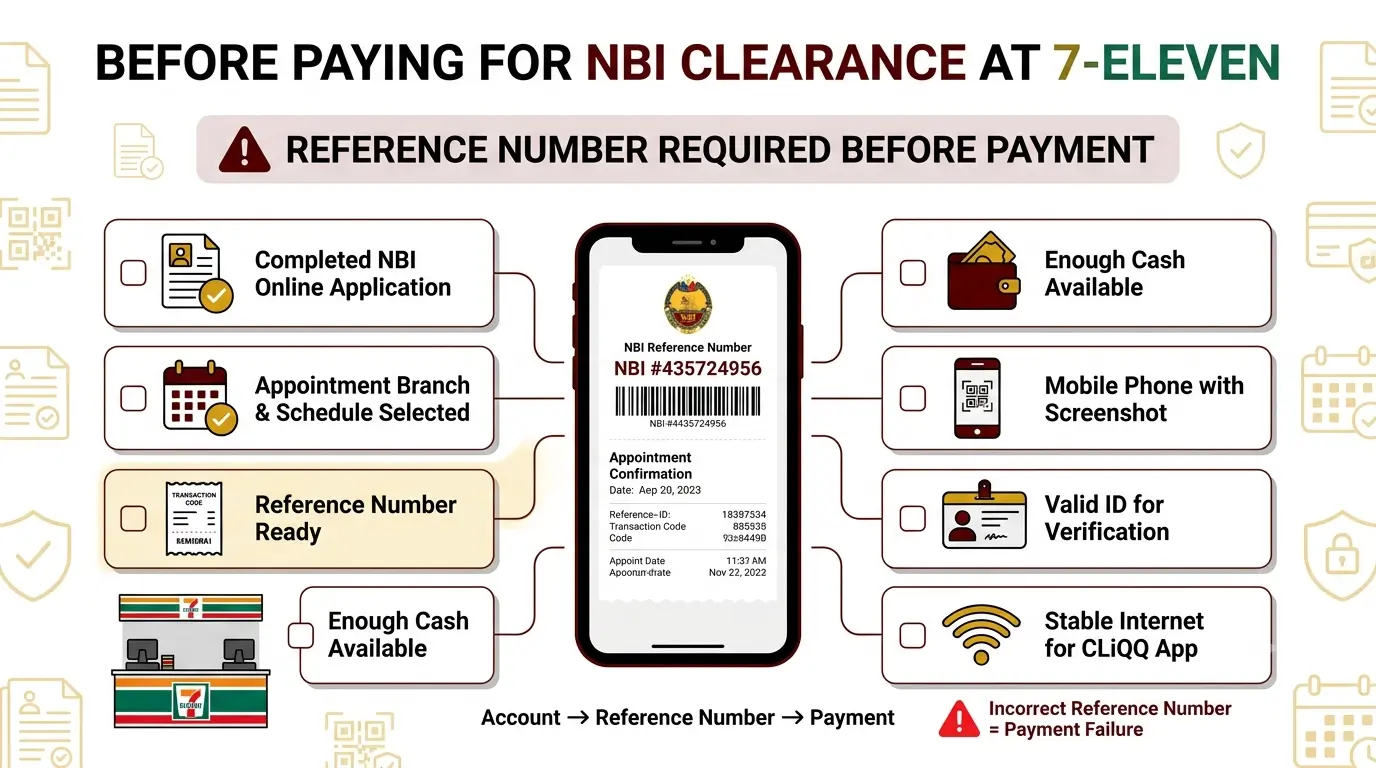
Prepare these before leaving
How to Pay NBI Clearance at 7-Eleven
Paying your NBI Clearance through 7-Eleven is a convenient option for applicants who prefer cash payments. You can complete the transaction using the CLiQQ mobile app or a CLiQQ kiosk available at participating 7-Eleven stores. Before starting, make sure you have your NBI reference number and the exact payment amount from your NBI Clearance transaction.
Looking for a digital payment method? Read the GCash payment guide to complete your NBI clearance payment from your mobile phone.
Step 1: Open the CLiQQ App or Use a CLiQQ Kiosk
Start by opening the CLiQQ mobile app on your phone or visiting a nearby 7-Eleven store with a CLiQQ kiosk. Both options allow you to generate a payment slip for your NBI Clearance transaction.
Make sure you have your NBI reference number ready before proceeding to the next step.
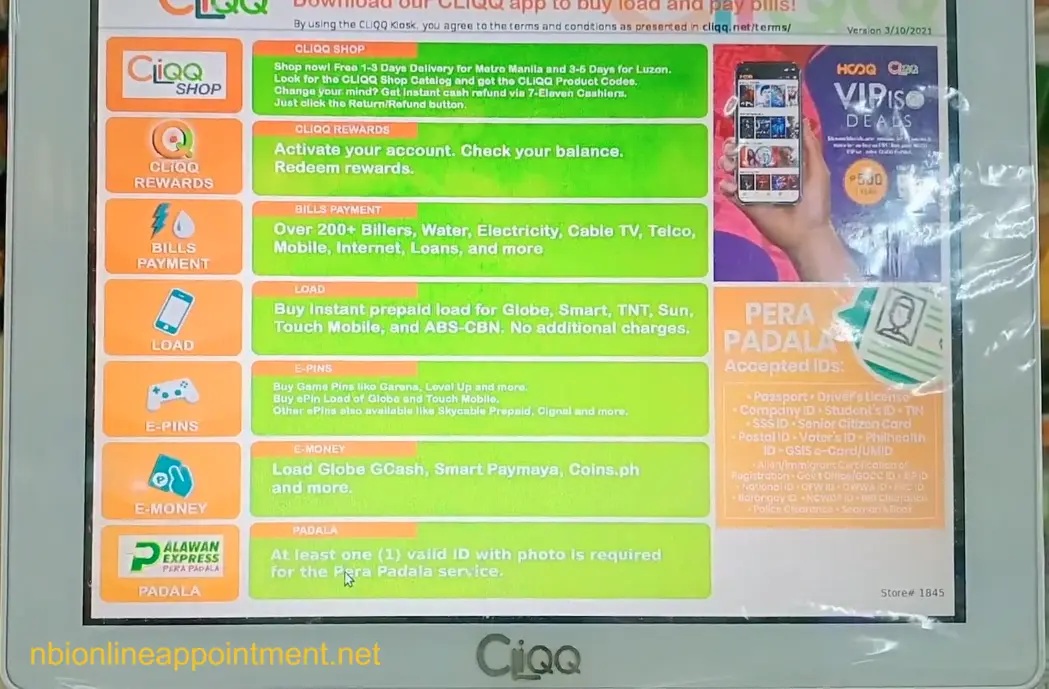
Step 2: Open the Bills Payment Menu
From the CLiQQ kiosk home screen, tap the Bills Payment option to access the list of available billers. This section allows you to pay government fees, utilities, loans, and other services through 7-Eleven.
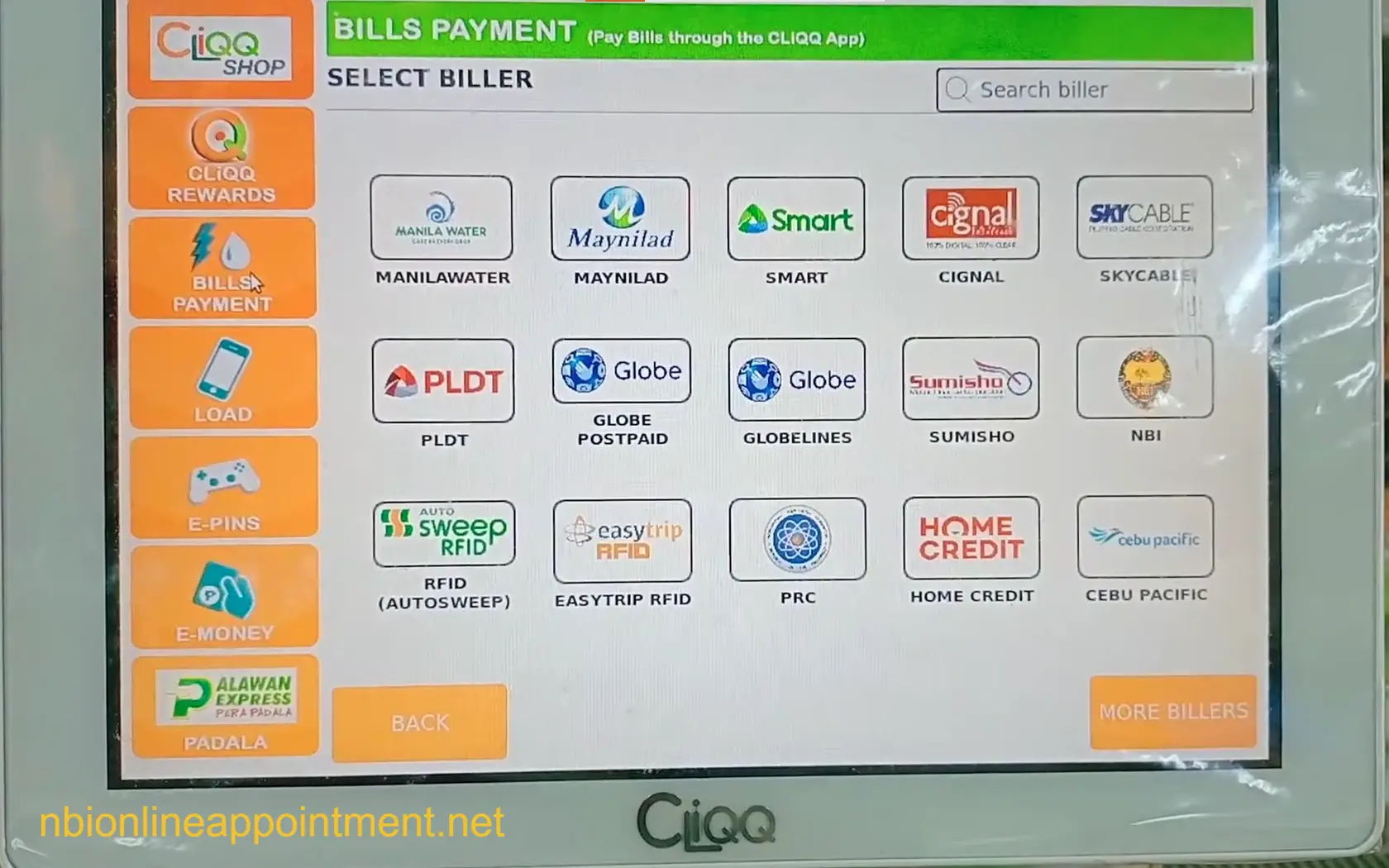
Step 3: Select NBI Clearance
After opening Bills Payment, look for NBI Clearance in the list of billers. Tap the NBI option to continue to the payment information screen.
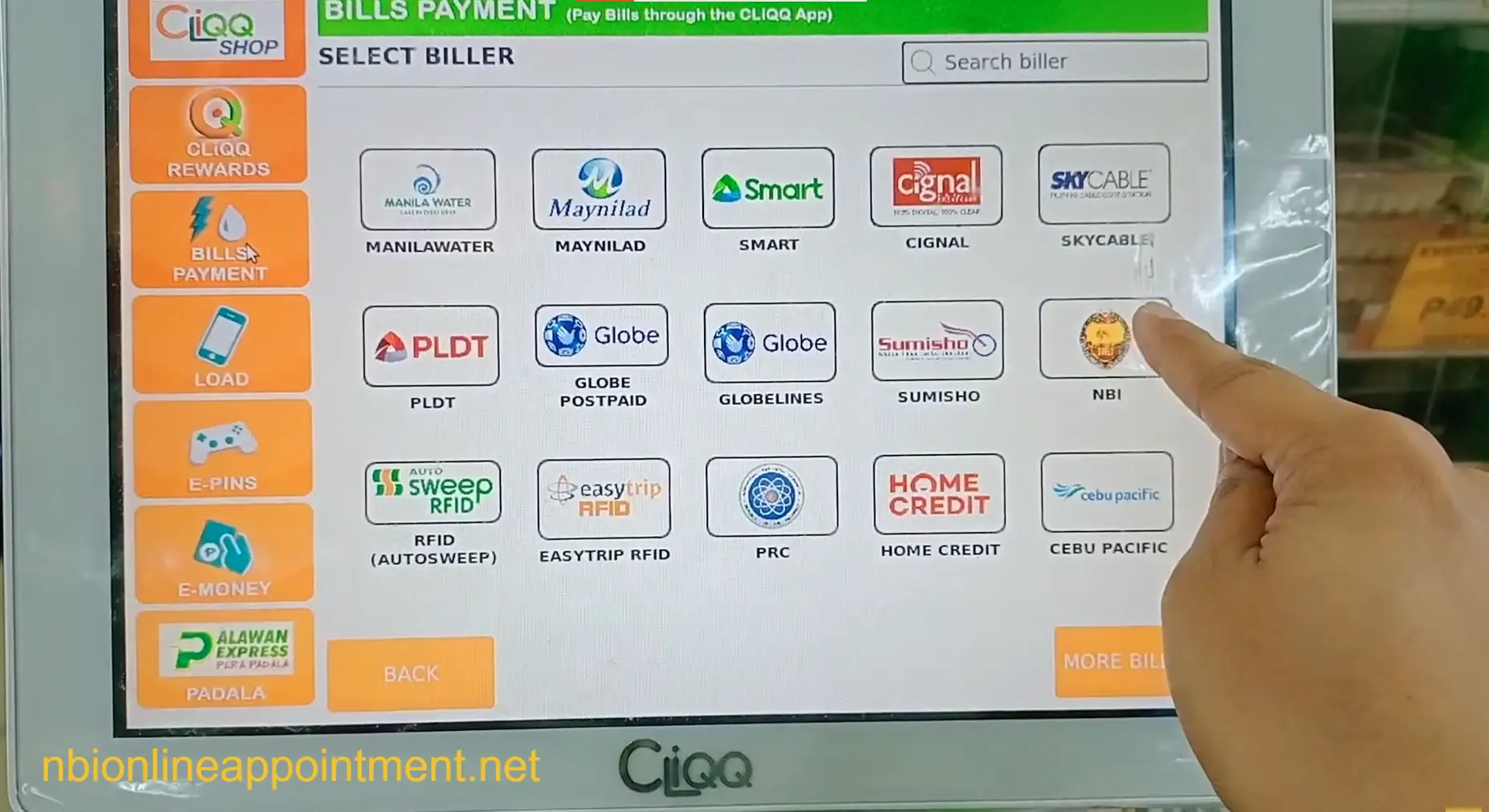
Step 4: Enter Your NBI Payment Details
On the payment form, enter the information associated with your NBI transaction. Make sure the reference number and payment amount match the details shown in your NBI Clearance account.
You will typically be asked to provide:
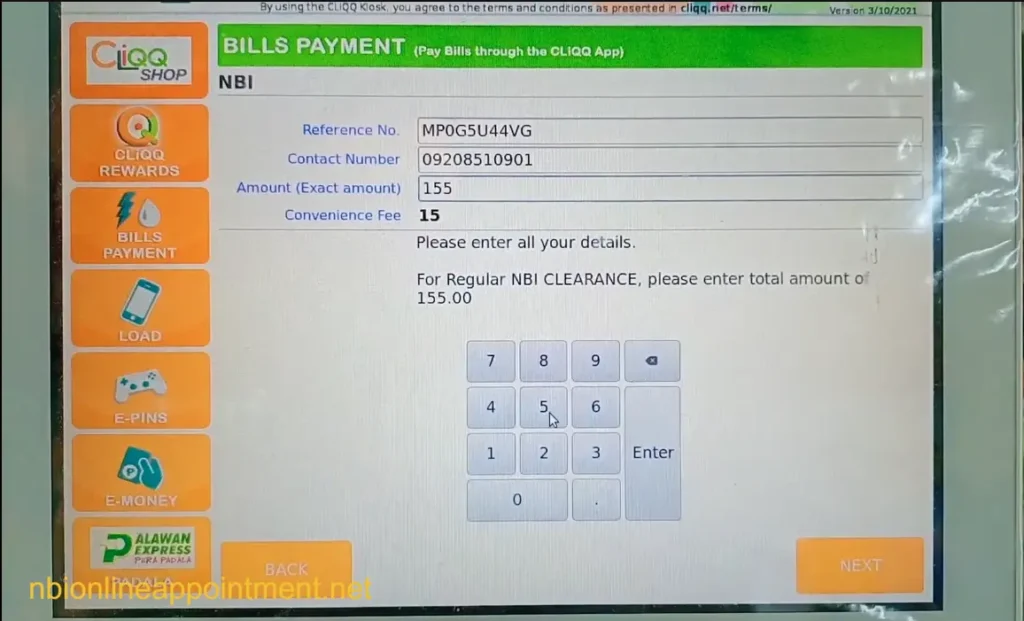
Step 5: Enter Your Mobile Number
The kiosk may ask for a mobile number where payment notifications can be sent. Enter an active number and review it carefully before proceeding to the next screen.
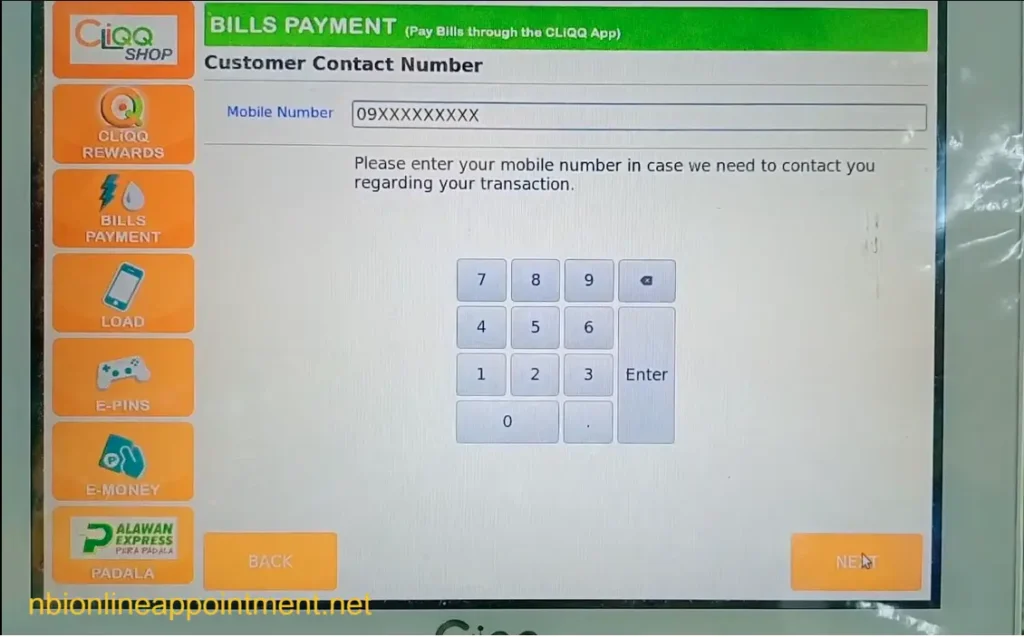
Step 6: Review and Confirm Your Information
Before generating the payment slip, the kiosk will display a summary of the details you entered. Check the reference number, mobile number, and payment amount carefully to ensure everything is correct.
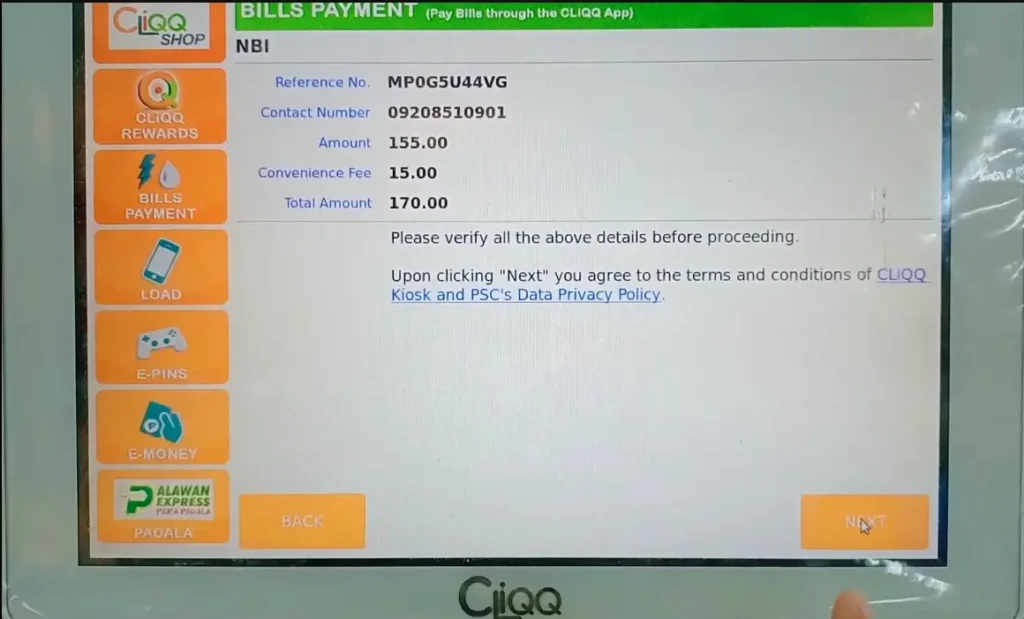
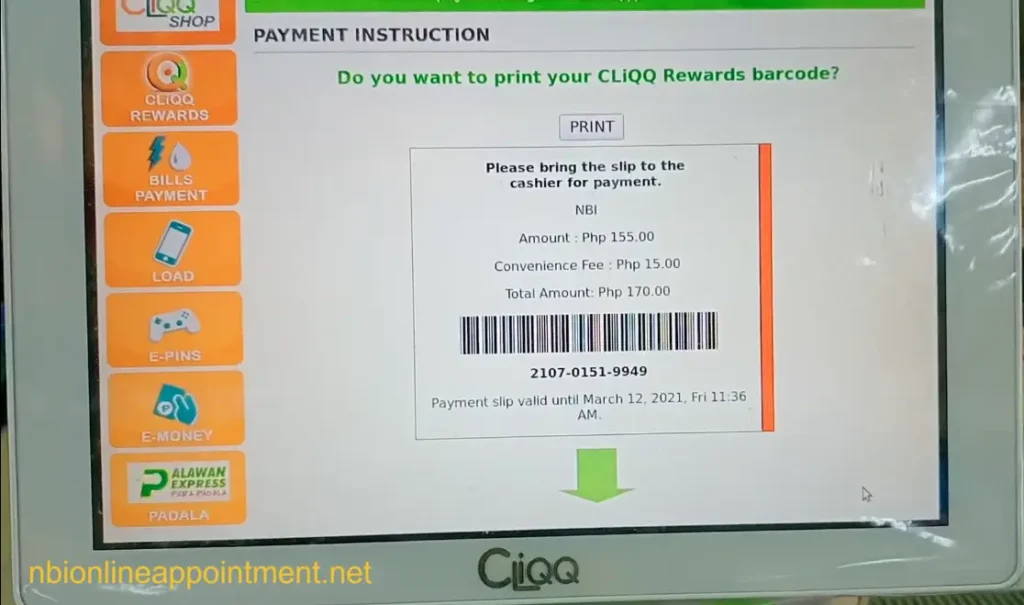
Step 7: Print the Payment Receipt
After confirming the transaction, the kiosk will generate a payment slip containing a barcode and transaction details. Print the receipt and bring it to the 7-Eleven cashier for payment.
How Much to Pay for NBI Clearance
in 7-Eleven
The base NBI Clearance fee is commonly ₱130, but the final amount can be higher because payment channels may add service or system fees. Many applicants report paying around ₱155 to ₱160 through third-party payment channels, but the exact amount can change. The safest rule is to follow the amount shown in the NBI system or CLiQQ screen before payment. Do not rely only on old screenshots or older guides.
Payment cost may include:
If the amount at 7-Eleven is different from what you expected, check the reference number and biller before paying. A small difference may be a convenience fee, but a very different amount can mean wrong details. Ask the cashier before completing the payment if something looks unusual.
How to Know If Payment Was Successful
After paying at 7-Eleven, log in to your NBI Clearance online account and check the transaction status. It should update from pending to paid once the payment is posted. Some payments reflect quickly, while others may take longer depending on the system or payment channel. Keep your receipt until the clearance is released, especially if your payment does not reflect right away.
Check these after payment:
If the status does not update immediately, wait for some time and check again. Avoid paying a second time too quickly because duplicate payment problems can be harder to fix. If the payment still does not appear after a reasonable waiting period, contact NBI or the payment channel with your receipt details.
Common Problems and Fixes
The most common problem is an incorrect reference number. Applicants sometimes mistype one digit at the kiosk or choose the wrong biller in the CLiQQ app. Another issue is a system error at the store, which can happen if the kiosk is offline or the cashier cannot scan the barcode. Payment reflection delays can also happen, so the receipt becomes very important.
Common issues and what to do: