NBI Clearance Verification
Learn how to verify your NBI Clearance
online in a few easy steps.
NBI Clearance Verification
NBI Clearance Verification is the process of checking if an NBI Clearance is valid, genuine, and matches the details of the person presenting it. In the Philippines, this is useful for job applications, agency requirements, overseas processing, school records, business transactions, and personal document checking. A clearance may look real at first glance, but online verification helps confirm if the details match the NBI record. It is also helpful when an employer, recruiter, or applicant wants to avoid fake or altered documents.
The usual way to verify an NBI Clearance is by using the NBI ID number or scanning the QR code printed on the clearance certificate. These details help confirm whether the clearance record can be found in the verification system. The process is different from applying for a new clearance, renewing an old clearance, or tracking a delivery. Verification only checks an existing clearance document, so you need the issued clearance details before starting.
What Is NBI Clearance Verification?
NBI Clearance Verification means checking the authenticity of an issued NBI Clearance. It helps confirm that the document is not fake, edited, expired, or mismatched with another person’s information. The system may ask for details such as the NBI ID number, clearance number, or QR code from the printed certificate. If the record is valid, the verification result should match the holder’s details.
This process is useful because NBI Clearance is often used as a trusted document in the Philippines. Employers, agencies, and applicants may need to confirm that the clearance is real before accepting it. Verification can also help users check if they copied the correct NBI number or received the correct document. If the system cannot find the record, the applicant may need to review the details or contact NBI support.
When Do You Need to Verify
an NBI Clearance?
You need NBI Clearance Verification when you want to confirm that a clearance certificate is genuine and still matches the holder’s record. This is common during hiring, pre-employment screening, visa-related processing, overseas job applications, and agency compliance checks. Some applicants also verify their own clearance before submitting it to avoid embarrassment or delays. If you received a digital copy from someone, verification becomes even more important.
You may also need verification if the clearance looks unclear, has a damaged QR code, or contains details that do not match the applicant’s ID. For example, the name, birthday, photo, or NBI ID number may need checking before submission. Verification is not meant for guessing someone’s record through a name search. You normally need the actual clearance details from the document itself.
What Details Do You Need for NBI Verification?
For NBI Clearance Verification, you usually need the NBI ID number or the QR code printed on the clearance certificate. The NBI ID number is different from the payment reference number used during appointment or application. A reference number is mainly used for payment, booking, or transaction tracking. The NBI ID number is tied to the issued clearance document and is more relevant for validation.
You may also need to compare the holder’s name, birth date, photo, clearance purpose, and issue date after the result appears. If you are verifying a clearance for employment or agency use, ask for a clear copy of the full certificate. Do not rely on a cropped image that hides the QR code, NBI number, or important document details. A complete copy makes it easier to spot mismatches.
|
Detail |
Where It Is Usually Found |
Why It Matters |
|---|---|---|
|
NBI ID number |
Printed on the clearance certificate |
Used for online verification |
|
QR code |
Printed on the clearance certificate |
Can be scanned for faster checking |
|
Full name |
Main personal details area |
Must match the holder’s ID |
|
Birth date |
Personal information area |
Helps confirm identity |
|
Issue date |
Clearance details area |
Helps check document freshness |
|
Photo |
Clearance certificate |
Must match the person presenting it |
How to Verify NBI Clearance Online
To verify an NBI Clearance online, use the verification option connected to the official NBI Clearance system and enter the details from the issued certificate. The exact display may change over time, but the purpose remains the same. You either enter the NBI ID number manually or scan the QR code from the document. After submitting the details, review the result carefully.
Make sure you are using the correct government-related NBI Clearance service and not a random page that asks for unnecessary personal data. Some websites write about NBI verification but are not official verification tools. If a page asks for sensitive details that are not needed for checking a clearance, be careful. Verification should be simple and based on the clearance document details.
During the verification process, some applicants may receive a HIT status, so it is helpful to understand the NBI HIT status meaning and what happens next.
Method 1: Verify using the NBI ID number
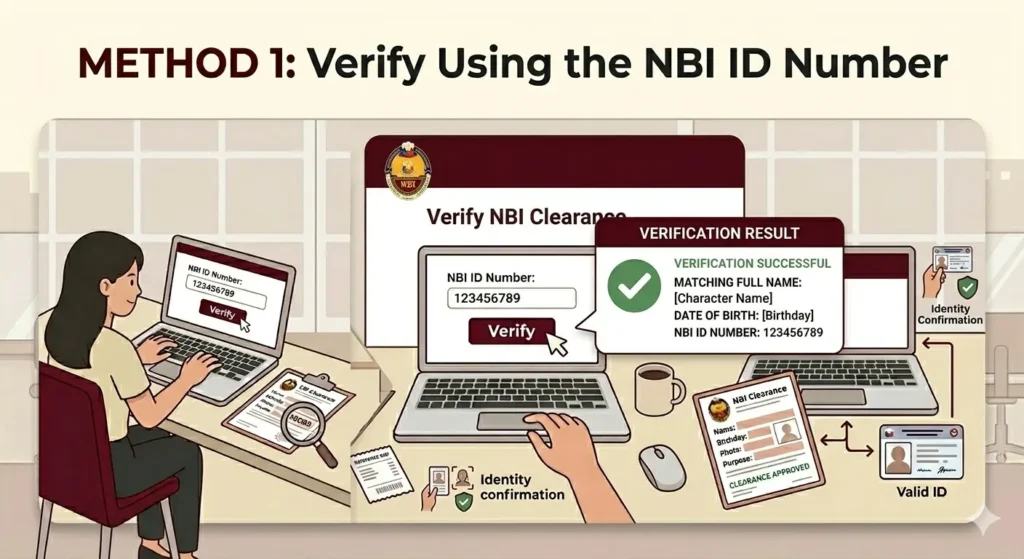
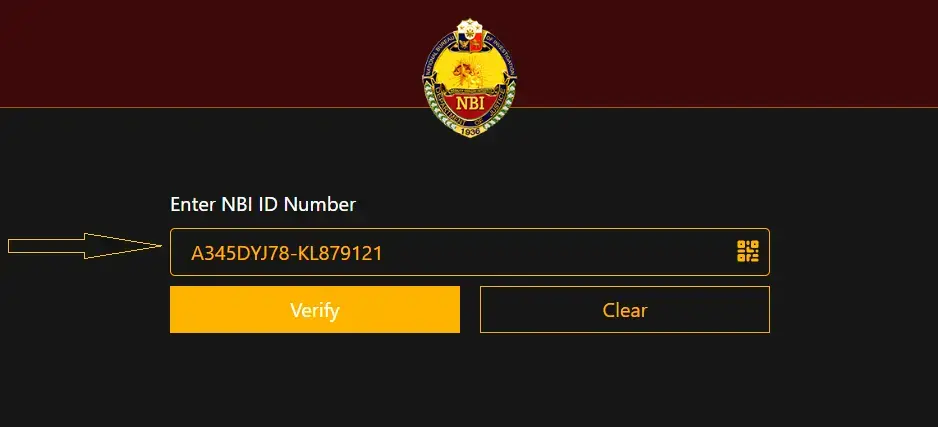
The first method is to enter the NBI ID number printed on the clearance certificate. Type the number exactly as shown and avoid adding spaces, missing characters, or confusing similar-looking letters and numbers. If the system says it cannot find the given NBI ID, check the number again before assuming the clearance is fake. A simple typing error is one of the most common reasons verification fails.
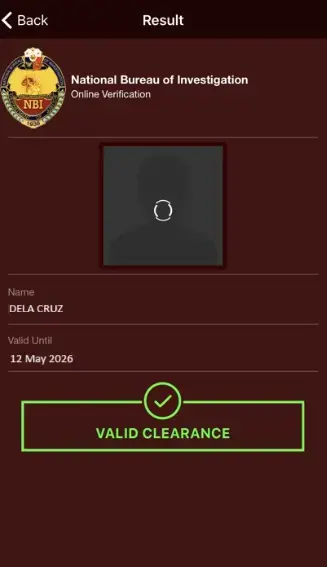
After entering the NBI ID number, click the verify button and wait for the result. If the clearance is found, compare the result with the certificate and the person’s valid ID. Check the spelling of the full name, birthday, and other visible details. If the result does not match the document, do not accept it without further checking.
Method 2: Verify using the QR code
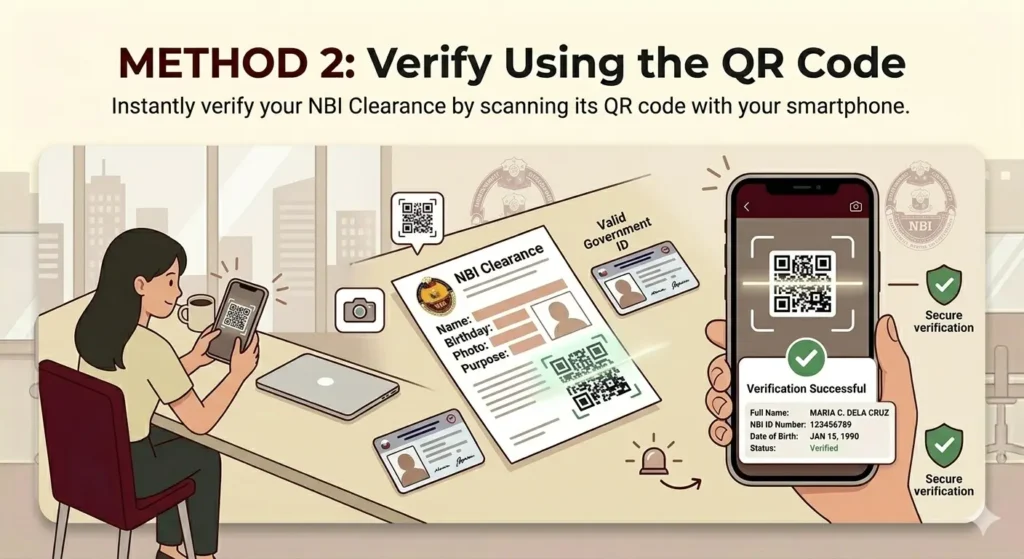
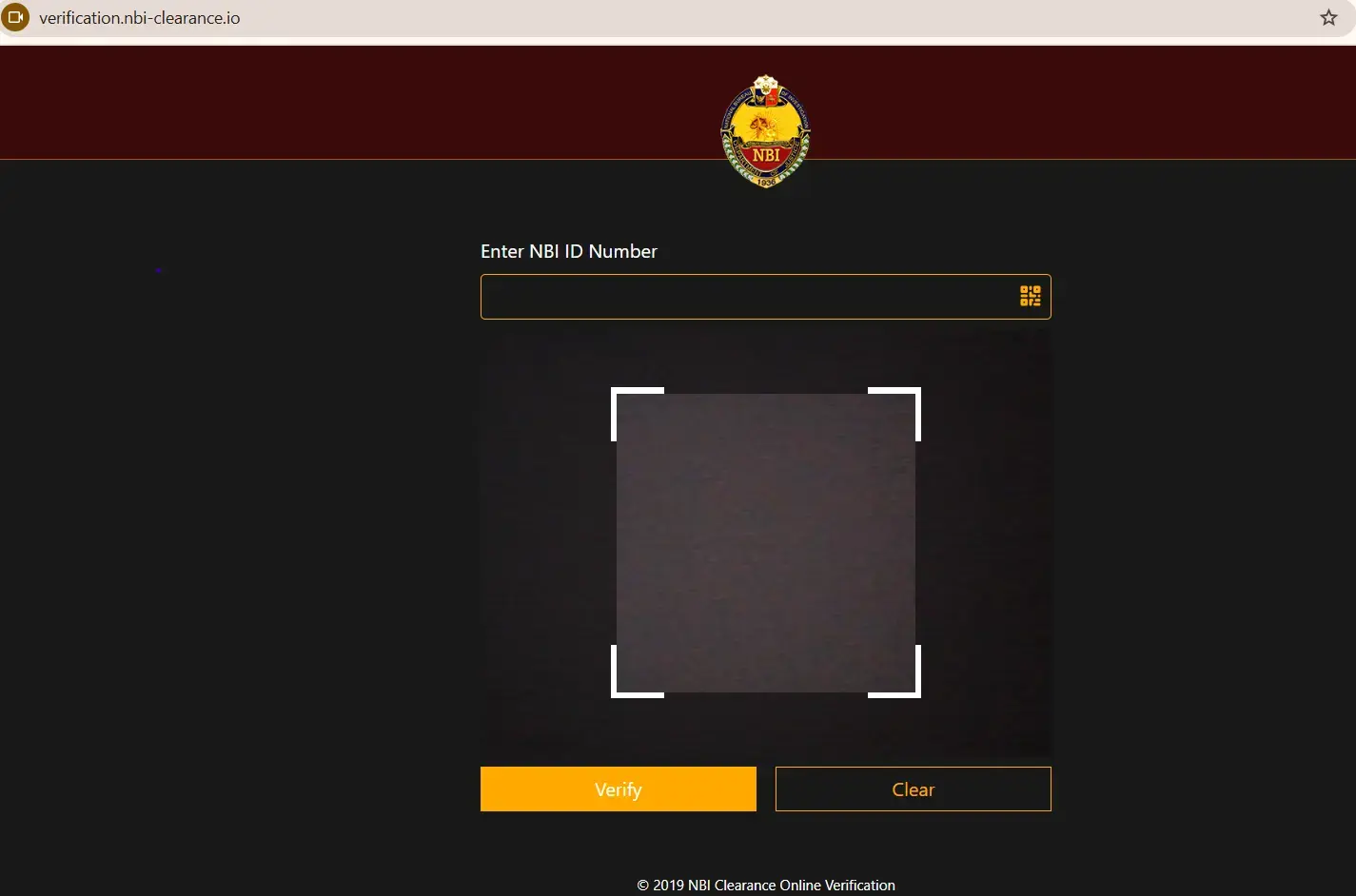
The second method is to scan the QR code printed on the NBI Clearance certificate. This is often easier because you do not need to type the NBI ID number manually. Open the scanner option, allow camera access if required, and place the QR code clearly inside the scanner frame. Make sure the document is not folded, blurred, or covered by glare.
If the QR code does not scan, clean the camera lens and improve the lighting. You can also try scanning from another phone or laptop if the first device fails. If the QR code is damaged, faded, or cropped from a digital copy, use the NBI ID number method instead. If both methods fail, the document may need manual checking through NBI support.
How to Check If an NBI Clearance Is Genuine
A genuine NBI Clearance should have details that match the verification result and the person presenting the document. The name, photo, issue date, and other identifying information should look consistent. The clearance should also have official formatting and physical security marks when printed. If the document looks edited, blurry, or uneven, verify it before accepting it.
For physical copies, check the quality of the paper, print, QR code, and official marks. A real clearance should not look like a low-quality screenshot printed on ordinary paper without proper details. If you are checking a scanned copy, ask for a clearer image if the QR code or NBI number cannot be read. Do not accept a document only because it “looks official.”
|
What to Check |
Good Sign |
Warning Sign |
|---|---|---|
|
NBI ID number |
Record appears during verification |
System cannot find the number |
|
QR code |
Scans and shows matching details |
QR does not scan or points elsewhere |
|
Name and birthday |
Match the person’s valid ID |
Spelling or date mismatch |
|
Photo |
Looks like the holder |
Photo appears edited or unclear |
|
Print quality |
Clear and readable |
Blurry, cropped, or altered |
|
Issue date |
Reasonable for the requirement |
Very old or inconsistent |
NBI Clearance Verification vs NBI Clearance Status Check
NBI Clearance Verification is not the same as checking your application status. Verification checks an already issued clearance certificate. Status check usually refers to checking whether your clearance application, appointment, delivery, or release is still pending. Many users confuse these because both involve the NBI portal, reference numbers, and online checking.
If you are asking “Is my clearance real?” you need verification. If you are asking “Is my clearance ready?” you need status checking or branch follow-up. If you are asking “Where is my delivered clearance?” you need delivery tracking. Using the right process helps you avoid entering the wrong number in the wrong place.
|
User Question |
Correct Process |
|---|---|
|
Is this NBI Clearance genuine? |
NBI Clearance Verification |
|
Is my application ready for release? |
NBI status check |
|
Where is my delivered clearance? |
NBI clearance delivery tracking |
|
Is my payment confirmed? |
Payment or reference number check |
|
Can I get another copy? |
Reprint, renewal, or branch inquiry |
Common NBI Verification
Problems and Fixes
The most common problem is seeing a message like “the system cannot find the given NBI ID.” This can happen when the NBI ID number is typed incorrectly, the document is too old, the record has a system issue, or the number being entered is not the actual NBI ID. Check the certificate again and make sure you are not entering the payment reference number. If you only have a reference number, it may not work for document verification.
Another common issue is a QR code that will not scan. This usually happens because the image is blurred, the paper is folded, the camera is dirty, or the digital copy is cropped. Try better lighting, a clearer copy, or another device. If the QR code still fails, use the manual NBI ID number method.
Some users also confuse NBI verification with NBI login. You do not always need to log in to verify a clearance, depending on the verification tool available. NBI clearance login is usually for application, renewal, appointment, or account access. Verification is focused on confirming the issued clearance certificate.
|
Problem |
Possible Cause |
What to Do |
|---|---|---|
|
System cannot find NBI ID |
Wrong number entered |
Recheck the printed NBI ID number |
|
QR code will not scan |
Blurry, damaged, or cropped code |
Use better lighting or manual ID entry |
|
Reference number not working |
Wrong number type |
Use NBI ID number instead |
|
Details do not match |
Altered document or data issue |
Ask for clarification or contact NBI |
|
Page not loading |
Internet or browser problem |
Try another browser or device |
|
Delivery not showing |
Verification is not tracking |
Use delivery tracking support |
Tips Before You Verify
an NBI Clearance
Always verify from a clear copy of the full clearance certificate. The QR code, NBI ID number, name, issue date, and photo should be visible. If someone sends only a cropped screenshot, ask for a complete copy before checking. This protects both the applicant and the person reviewing the document.
Do not share your NBI account password, email login, or private OTP just to verify a clearance. A legitimate verification check should not require someone to access your personal account. If an employer or agency needs to verify your clearance, they should only need the document details. Keep your login details private to avoid account misuse.
Check the clearance against a valid ID when verification is for employment or agency use. The online result may confirm the document, but the person presenting it should still match the name, photo, and birthday. If there is a name change due to marriage or correction, ask for supporting documents. This avoids rejecting a genuine clearance just because the applicant’s details changed.